 0413 107 893
If you've been handed a keyword list and told to "build a landing page for the Google Ads campaign," you've probably already done the obvious stuff. The page loads fast, it looks good on mobile, the form works. Technically, it's solid.
Google isn't grading your page on how clean the code is. It's grading it on relevance. And relevance, in the context of Quality Score, is something most developers never get briefed on because it lives in PPC territory. Pages get built to spec, campaigns go live, and then six weeks later someone's asking why the cost per click is higher than expected and the keywords are sitting at a 4.
This piece is for the developer or designer building the page. Speed, mobile responsiveness, and layout are assumed sorted. What we're covering is how to make sure the page you build actually signals the right things to Google, and why the decisions you make at launch have consequences that compound for months.
The Mistakes That Kill Quality Score Before the Campaign Even Launches
Most landing page experience problems don't start in the campaign. They start at the build stage, in decisions that seemed reasonable at the time but weren't made with Quality Score in mind. These are the ones that come up repeatedly.
| Mistake | Why It Hurts QS |
|---|---|
| Building without a keyword brief | Page is built around the business, not the keyword. Relevance suffers from the first impression. |
| Generic H1 ("Welcome to Our Site") | Weakest possible relevance signal at the crawler's first read. |
| One page serving multiple ad groups | Dilutes relevance for every keyword theme routed to that page. |
| Form below the fold on mobile | Elevates bounce rate, which feeds directly into landing page experience scoring. |
| Thin copy (under 300 words) | Not enough content for Google to confidently assess page relevance. |
| No trust signals | Increases bounce rate; page reads as low-quality to both crawler and visitor. |
| Location keyword absent from H1 and opening copy | Missed relevance signal for localised keyword targets. |
| Copy describing the business instead of addressing the visitor | Fails to match search intent; visitor bounces, score suffers. |
Every section in this piece maps directly to one or more of these. If you're building a new page, treat this table as a pre-launch checklist. If you're diagnosing an underperforming campaign, it's usually where to start.
What Google Is Actually Evaluating
Speed and mobile are table stakes. If your page fails Core Web Vitals, that's worth fixing, but it's not what's dragging your landing page experience score down in most cases. What actually determines that score comes down to three things, and all three connect directly to the mistakes above.
Keyword-to-Content Relevance
Google's crawler reads your page roughly the way a person skims it: headline first, subheadings next, then body copy. It's trying to determine whether the page content matches what the keyword implies the visitor is looking for. A generic H1, copy written about the business rather than the visitor's need, or a location keyword that doesn't appear until the footer. These all register as weak relevance signals. The crawler picks them up the same way a reader would notice a page that doesn't quite answer what they searched for.
Content Depth and Clarity
Thin pages score poorly. A hero section, a few dot points, and a form doesn't give Google enough to confidently assess what the page is about. There needs to be enough substantive, keyword-relevant copy for the crawler to build a clear picture of the page's subject. A page serving multiple ad groups compounds this problem. It can't go deep on any single keyword theme without becoming irrelevant to the others.
User Behaviour
If visitors arrive and immediately bounce back to the search results, Google reads that as a failed experience. That back-click is a direct signal. High bounce rate on paid traffic is both a conversion problem and a Quality Score problem. A form buried below the fold, no trust signals to reduce hesitation, copy that doesn't address what they came for. All of it elevates that bounce rate and feeds it back into the score.
Work From the Keyword
The root cause of most relevance problems is building without looking at the keyword brief. In most real-world engagements, you won't receive finished ad copy either. You'll get a keyword list and a general sense of what the campaign is supposed to do. That's enough, if you know how to read it.
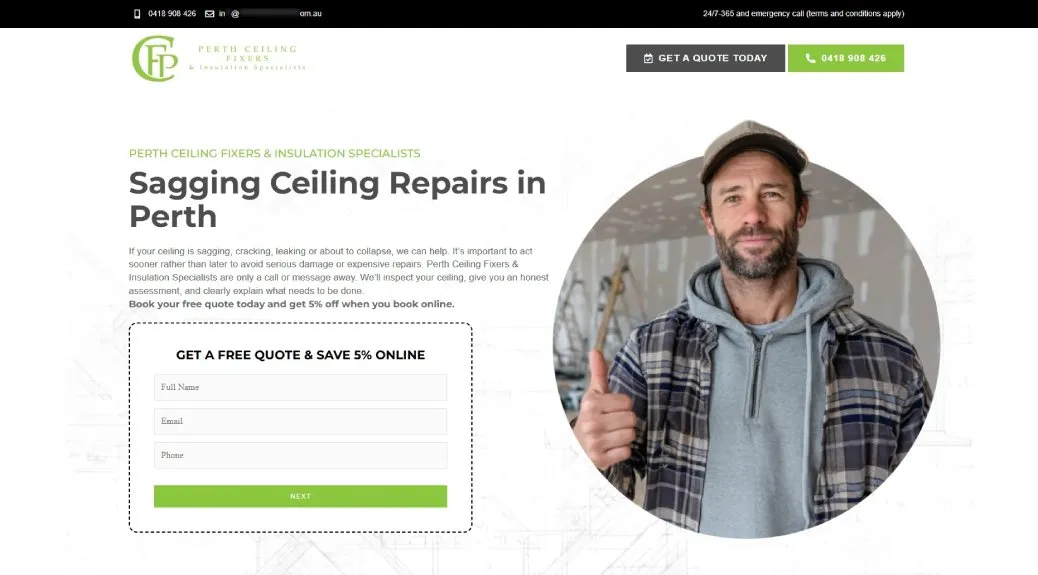
Let's take for example a real-world google ads case study from home renovation niche, Perth Ceiling Fixers, a WA-based trades business with several distinct service lines running across separate ad groups. It's a helpful reference because the keyword themes are different enough to show why the distinctions matter.
Primary Intent
"Ceiling repair Perth" is a service request. The person wants someone to come and fix something. A page built for that keyword needs to lead with action: a form, a phone number, a clear offer. "How to fix a sagging ceiling" is a research query. Same business, completely different structure required. Getting that intent wrong at the build stage is how you end up with a service page structured like a blog post, or an informational page with a hard sell above the fold.
Location Signals
Location signals matter more than most developers realise. If the keyword includes a suburb or city, that location should appear in the H1, the opening paragraph, and the meta title. A page targeting "insulation removal Perth" that only mentions Perth once, buried in the footer, is leaving an obvious relevance signal on the table. It's one of the easiest mistakes to prevent if you're looking at the keyword before writing a single line of copy.
Service Specificity
"Insulation removal" and "ceiling repair" can both belong to the same business, but they have different intents and different audiences. A visitor searching insulation removal wants to know the process is safe, the disposal is handled, and that you can quote quickly. They do not want a general ceiling services page with insulation mentioned somewhere in the third paragraph.
Before you start, ask the PPC management team for the primary keyword per ad group, the match types in use, whether this is a new campaign or an existing rebuild, and if it's existing, what the Search Terms Report is showing. That last one often gets skipped, but it tells you what queries are actually triggering the ads. Sometimes that's quite different from the intended keyword list.
One Ad Group, One Landing Page
This is the structural decision that matters most, and the one that gets pushed back on most often because it creates more pages to build.
Google evaluates relevance at the keyword level. A page needs to be specifically about the thing being searched, not generally about the business that offers it. A homepage serves every visitor equally, which means it serves no visitor specifically. A general services page is marginally better but still too broad to score well for any individual keyword theme. Routing multiple ad groups to the same destination is how you guarantee mediocre relevance scores across all of them.
The right model is one tightly themed page per ad group, with copy written around that ad group's keyword cluster. If the PPC team has five ad groups, the correct answer is five pages. If the brief asks for one page to cover all of them, that's worth pushing back on. Not because it's more work, but because it won't perform.
Perth Ceiling Fixers is the clearest example of what this looks like in practice. Three ad group themes (ceiling repairs, ceiling fixing, and insulation removal) each got their own dedicated page. The insulation removal page peaked at a 21.58% conversion rate. That result didn't come from design quality alone. It came from a visitor searching "insulation removal Perth" landing on a page that was specifically and entirely about insulation removal in Perth. The keyword-to-page match was clean at every level.
Relevance Architecture
Once you know what the keyword is, you need to place it deliberately throughout the page. This is how you fix the generic H1, the missing location signal, and the copy that describes the business rather than addressing the visitor.
The title tag should lead with the primary keyword, as close to the front as natural language allows. "Ceiling Repair Perth | Fast Quote, Same-Week Service" is a stronger relevance signal than "Perth's Trusted Ceiling Specialists." The H1 should mirror the keyword or a close natural variant. It's the first thing Google's crawler reads and the first thing the visitor reads. A generic heading at that position weakens both signals immediately.
The opening paragraph carries significant weight. The primary keyword, the specific problem or need, and the location should all appear within the first 100 words. At least one subheading should contain a keyword variant or a direct reference to the service. Subheadings are weighted signals, not cosmetic structure. The meta description doesn't directly affect Quality Score, but it influences CTR, which does. Write it to match the implied promise of any reasonable ad for that keyword.
Where most pages lose relevance points is in the body copy itself. "We provide ceiling repair services across Perth" is not useful to Google or to the visitor. "Sagging panels, water damage, or noise coming through from upstairs. We inspect, quote, and repair within 48 hours" addresses an actual concern. It contains relevant language and answers an implicit question. Re-Seal Shower and Tiling is a solid example of this: restructuring landing page copy around specific keyword placement, without any structural page changes, produced measurable Quality Score movement on its own.
Page Architecture for Conversion
Everything a visitor needs to make a decision should be visible without scrolling. On mobile, the form or primary CTA button should be within the first screenful. Not a link to a form. The form itself. This is the fix for the buried form problem, and it's architectural. Once the page is built with the form below the fold, fixing it later means a rebuild, not a tweak.
A visitor arriving from a Google Ad has already made a decision in principle. They searched, they saw the ad, they clicked. The page's job is to close the gap between intent and conversion as quickly as possible. Every extra scroll before they find the form is friction that costs conversions and elevates bounce rate. Elevated bounce rate, as covered earlier, feeds directly back into Quality Score.
Below the fold, follow a problem-to-solution arc. Lead with the customer's specific problem using language drawn from the keyword cluster. Establish that you understand the situation. Then introduce the solution. Avoid leading with company history or a general "about us" section. That belongs further down, after the visitor's primary concern has been addressed. Place a CTA after the problem-solution section and again near the bottom. A visitor who reads to the bottom has indicated genuine interest. Make the next step easy to find.
Trust signals are the other architectural fix worth calling out specifically. Verified reviews, licence numbers, service area confirmation, and response time commitments reduce the hesitation that causes visitors to bounce. A page without them reads as thin to both Google's crawler and the visitor. Adding them is not a design afterthought. It's part of the relevance and conversion architecture.
The Perth Ceiling Fixers numbers make the case plainly. Before dedicated pages with this architecture: three leads per month at A$389.95 cost per conversion. After: fifty leads per month at A$30.53, on a spend roughly A$500 lower. By February 2026, six months later, the account held a 20.78% conversion rate and A$23.98 cost per click. The structural decisions made at launch were still compounding.
The Ad-to-Page Promise
Without seeing the exact ad copy, the page still needs to deliver on what any sensible ad for that keyword would promise. This is something you can reverse-engineer from the keyword itself.
If the keyword is "insulation removal Perth," a reasonable ad would promise local service, a clear quote process, and some indication of how the job is handled: safety, disposal, timeframe. The page should address all three. If the keyword is "emergency ceiling repair," the ad almost certainly implies speed and availability. The page needs to make those things explicit and make them visible early.
The most common promise mismatches follow a familiar pattern. An ad that implies a free quote sending visitors to a page with no form. An ad targeting a specific suburb sending visitors to a page that only mentions the broader city. An ad implying same-day service sending visitors to a page that says nothing about availability. Each of these is a mismatch that both Google's crawler and the visitor will register, and both respond to the same way: by leaving. That back-click registers as a behaviour signal, the bounce rate climbs, and the landing page experience score follows it down.
How Long Before Quality Score Responds
Quality Score is updated as impression data accumulates, which means improvements to a landing page don't show up in the score immediately. For new campaigns with well-built pages, meaningful Quality Score data typically appears within two to four weeks of consistent traffic.
For existing campaigns being remediated, where a keyword has a history of poor performance, expect 30 to 60 days before the score fully reflects the improvements made. A keyword with a long track record of high bounce rates and low engagement doesn't recover overnight. The history weighs on it, which is exactly why the mistakes at the top of this piece are expensive to fix after the fact rather than prevent at the start.
This is the compounding argument for getting it right at launch. A month at QS4 compared to QS8 isn't only a cost-per-click difference during that month. It's also the time and traffic cost of rebuilding the score after corrective changes are made. Every click during the recovery period is more expensive than it should be.
The Perth Ceiling Fixers data illustrates what the alternative looks like. The structural and copy decisions made when the dedicated pages launched were still delivering returns in February 2026, six months on, with no page rebuilds required. Conversion rate at 20.78%. CTR at 9.98% from 1,543 impressions. Cost per conversion down a further A$6.55 since September. The page didn't need fixing because it was built to serve the keyword from the start.
Build It Once, Build It Right
Go back to the mistakes table at the top. Every item on it is preventable at build time. None of them require advanced skills or extra budget. They require the right brief, the right structure, and copy written around search intent rather than brand voice.
The developer's job in a Google Ads context is narrower than a general web build. The audience is a specific person who searched a specific thing and clicked an ad that made a specific promise. The page exists to fulfil that promise as directly as possible. Get the keyword brief from the Google ads management team before you start. Build one page per ad group theme. Put the form above the fold. Write the H1 to mirror the keyword. Make sure the copy addresses the visitor's actual concern rather than the client's preferred self-description.
These are disciplined decisions, not difficult ones. And the return compounds with every impression the campaign generates.
If you're looking for help beyond the build, whether that's Google Ads management, AI SEO, or both, Pitch Black works with businesses to drive measurable results across paid and organic.
Contact Pitch Black Today for a Free Consultation!